Back to Projects
ShellMind

ShellMind

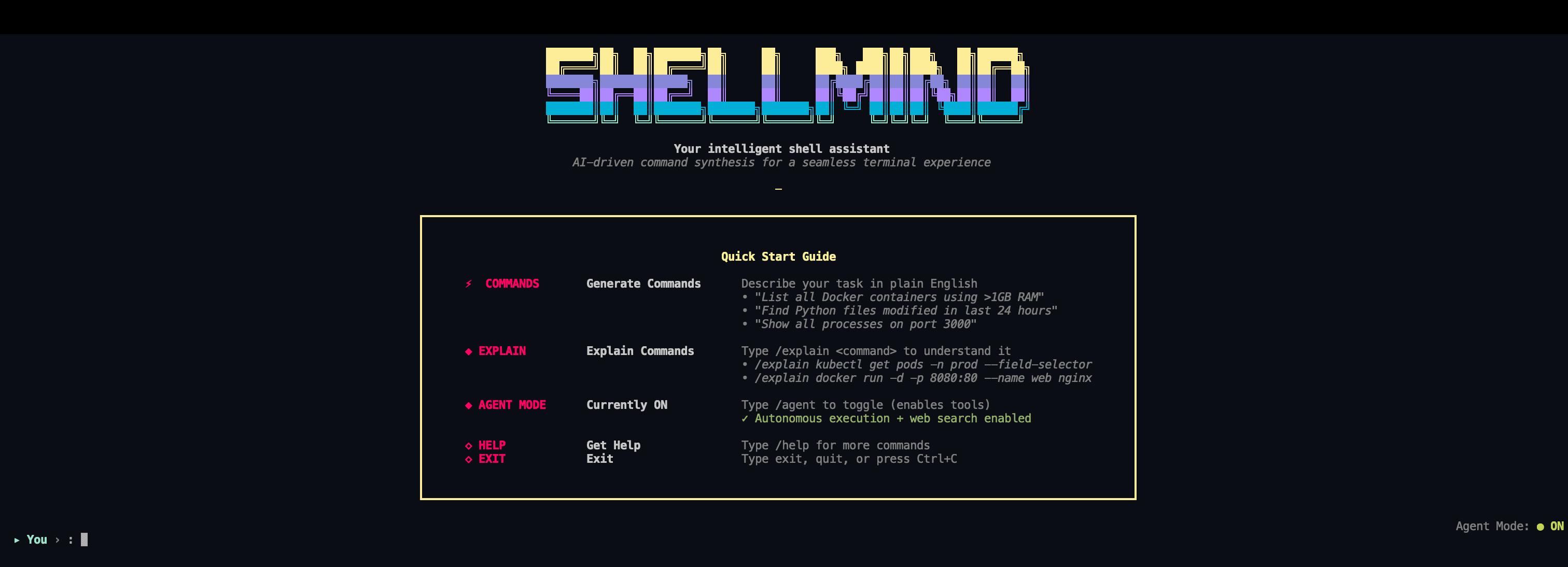
AI-powered CLI that translates plain English into shell commands. Get the right Docker, Kubernetes, Git, or AWS commands instantly — with explanations and safety checks built in.

Technology Stack

Python
AI Integration
CLI Development
Natural Language Processing
Groq API
Tavily Search

Key Challenges

  • Natural language to command translation
  • Context-aware command generation
  • Safety checks for destructive operations
  • Multi-tool support and orchestration
  • Web search integration for documentation

Key Learnings

  • CLI application development with Rich
  • LLM integration for command generation
  • Safety layer implementation
  • Agent mode for autonomous execution
  • Terminal UI best practices

ShellMind: AI-Powered Command Line Assistant

Overview

ShellMind is an AI-powered command-line interface that translates natural language into precise shell commands. Designed for developers, DevOps engineers, and system administrators, ShellMind bridges the gap between human intent and terminal commands, making complex operations accessible through plain English.

Core Features

Natural Language Processing

  • Plain English Commands: Describe what you want to do in natural language
  • Context-Aware Generation: Understands the context of your request
  • Multi-Tool Support: Works with Docker, Kubernetes, Git, AWS CLI, Terraform, and more
  • Interactive Clarification: Asks follow-up questions when commands need more context
  • Command Explanation: Understand what complex commands do with the explain feature

Safety & Execution

  • Built-in Safety Checks: Warnings for potentially dangerous operations
  • Confirmation Prompts: Dangerous commands require explicit confirmation
  • Direct Execution: Run generated commands with a single confirmation
  • Agent Mode: Autonomous tool execution for complex multi-step tasks

Advanced Features

  • Web Search Integration: Search documentation and find "how to" guides for unfamiliar tools
  • Command History: Track and reuse previously generated commands
  • One-Shot Mode: Generate and execute commands in a single line
  • Interactive Mode: Full terminal experience with follow-up questions

How It Works

Command Generation

Simply describe what you want to do in plain English:

You: Find all Python files modified in the last 7 days

ShellMind: find . -name "*.py" -mtime -7 -type f

Run this command? [y/N]: y

Command Explanation

Use the explain keyword to understand any command:

You: explain docker ps -a --format "table {{.Names}}\t{{.Status}}\t{{.Ports}}"

ShellMind: This Docker command lists all containers (including stopped ones) in a
formatted table showing:
- Container names
- Current status (running, exited, etc.)
- Published ports

The --format flag uses Go template syntax to customize the output columns.

Agent Mode

Agent Mode enables autonomous tool execution for complex multi-step tasks:

# Enable for this session
python -m cli.main --agent

# Set agent mode as your default
python -m cli.main --set-mode agent

What Agent Mode does:

  • Executes commands directly with tools
  • Performs web searches for documentation
  • Handles multi-step operations autonomously
  • Perfect for complex DevOps workflows

Supported Tools

Container & Orchestration

  • Docker - Container management and operations
  • Kubernetes - Pod, service, and cluster management
  • Helm - Kubernetes package management

Cloud Platforms

  • AWS CLI - EC2, S3, Lambda, RDS operations
  • Google Cloud - GKE, Cloud Storage, Cloud Functions
  • Azure - AKS, Blob Storage, Functions

Infrastructure as Code

  • Terraform - Infrastructure provisioning and management
  • Ansible - Configuration management and automation

Version Control

  • Git - Repository management, branching, merging
  • GitHub/GitLab CLI - Repository operations

Example Use Cases

File System Operations

"Find all large files over 100MB in my home directory"
"List all Python files modified in the last 24 hours"
"Find and remove all .log files older than 30 days"

Docker Operations

"Show me all running Docker containers"
"Stop all containers with exit code 1"
"Remove all dangling Docker images"
"Create a network named my-network and attach container nginx to it"

Git Operations

"Create a git branch called feature/new-ui"
"Show me the last 5 commits with author names"
"Undo the last commit but keep changes staged"
"Push all branches to remote origin"

Kubernetes

"Get all pods in the production namespace"
"Restart the deployment named api-server"
"Scale the frontend deployment to 5 replicas"
"Show all resources with label app=frontend"

System Administration

"List all processes using more than 1GB of memory"
"Check which process is using port 3000"
"Show disk usage for all mounted filesystems"
"Find all open network connections"

Technical Architecture

Core Components

  • LLM Engine: Powered by Groq's fast inference using Moonshot AI Kimi K2 Instruct
  • Natural Language Parser: Converts user input into structured command requests
  • Safety Layer: Validates operations and prevents harmful actions
  • Tool Registry: Manages available tools and their capabilities
  • Web Search Integration: Tavily API for documentation lookup

Technology Stack

  • Python 3.11+: Core language
  • Groq API: Fast LLM inference
  • Tavily API: Web search for documentation
  • Rich: Beautiful terminal interfaces
  • Textual: Terminal UI components

Why I Built This

Developer Pain Points

  • Command Memorization: Difficult to remember complex command syntax
  • Context Switching: Constantly searching for documentation
  • Safety Concerns: Risk of running destructive commands
  • Learning Curve: New tools require memorizing new commands
  • Productivity Loss: Time spent on manual command construction

Solution Goals

  • Natural Interface: Use plain English instead of memorizing syntax
  • Safety First: Built-in warnings and confirmations
  • Speed Up Work: Generate commands instantly
  • Learning Tool: Understand what commands do
  • Autonomy: Agent mode for complex workflows

Installation & Usage

Quick Start

# Clone the repository
git clone https://github.com/sidmanale643/shell-mind.git
cd shell-mind

# Set up environment variables
echo "GROQ_API_KEY=gsk_...your_actual_key_here" > .env
echo "TAVILY_API_KEY=tvly-...your_key_here" >> .env  # Optional

# Install dependencies
pip install -r requirements.txt

# Run ShellMind
python -m cli.main

One-Shot Commands

# Generate and execute a command
python -m cli.main "list all docker containers"

# Explain a complex command
python -m cli.main --explain "kubectl get pods -n production"

# Auto-execute without confirmation
python -m cli.main --execute "find large files in /tmp"

Development Status

Current Features

  • Natural language to command translation
  • Multi-tool support (Docker, Kubernetes, Git, AWS, etc.)
  • Command explanation mode
  • Safety checks and confirmations
  • Web search integration
  • Agent mode for autonomous execution
  • Beautiful terminal UI with Rich

Future Roadmap

  • Support for more tools and platforms
  • Custom tool plugins
  • Configuration file support
  • Command aliases and shortcuts
  • Team collaboration features
  • Integration with popular CLIs

Impact & Vision

ShellMind represents a shift in how developers interact with the terminal - making powerful shell operations accessible through natural language. Whether you're a seasoned DevOps engineer or just getting started with container orchestration, ShellMind helps you work faster and safer by translating your intent into precise commands.

The project is actively maintained and evolving based on real-world usage, with a focus on making the terminal more accessible and productive for everyone.

Designed by sidmanale643
© 2026. All rights reserved.