FileSense
A local-first semantic file search engine that combines traditional keyword search (BM25) with AI-powered semantic search (FAISS + sentence embeddings) to help you find your documents instantly.
Technology Stack
Key Challenges
- Implementing hybrid search combining BM25 and dense vector search
- Efficient text chunking for large documents
- Fast retrieval across thousands of documents
- Multi-format document processing (TXT, DOCX, PDF)
- OCR support for scanned PDFs
Key Learnings
- Hybrid search architectures
- Vector embeddings and semantic search
- BM25 lexical retrieval
- Document processing pipelines
- FastAPI with async operations
- React state management for search interfaces
FileSense: Local-First Semantic File Search Engine
Overview
FileSense is a powerful local-first semantic file search engine that combines traditional keyword search (BM25) with AI-powered semantic search (FAISS + sentence embeddings). Designed for personal knowledge management and document discovery, FileSense helps you find your documents instantly by understanding the meaning behind your queries, not just matching keywords.
Core Features
Hybrid Search Architecture
- BM25 Lexical Search: Fast keyword-based retrieval using the BM25 algorithm
- Dense Vector Search: Semantic understanding using sentence embeddings and FAISS
- Weighted Fusion: Combine both approaches with adjustable alpha parameter
- Reciprocal Rank Fusion (RRF): Rank-based fusion for better result diversity
- Parallel Execution: Both search methods run concurrently for optimal performance
Multi-Format Document Support
- TXT Files: Direct text extraction
- DOCX Files: Microsoft Word document parsing
- PDF Files: Text extraction with OCR support via Docling
- Smart Chunking: Intelligent text splitting (1000 chars, 100 overlap)
- Hash-based Deduplication: Skip already-indexed files automatically
Fast Retrieval Performance
- FAISS Vector Index: Millisecond-level search across thousands of documents
- Persistent Caching: BM25 and FAISS indices cached to disk
- Incremental Updates: Add new documents without rebuilding entire index
- Memory Mapping: Efficient FAISS index loading
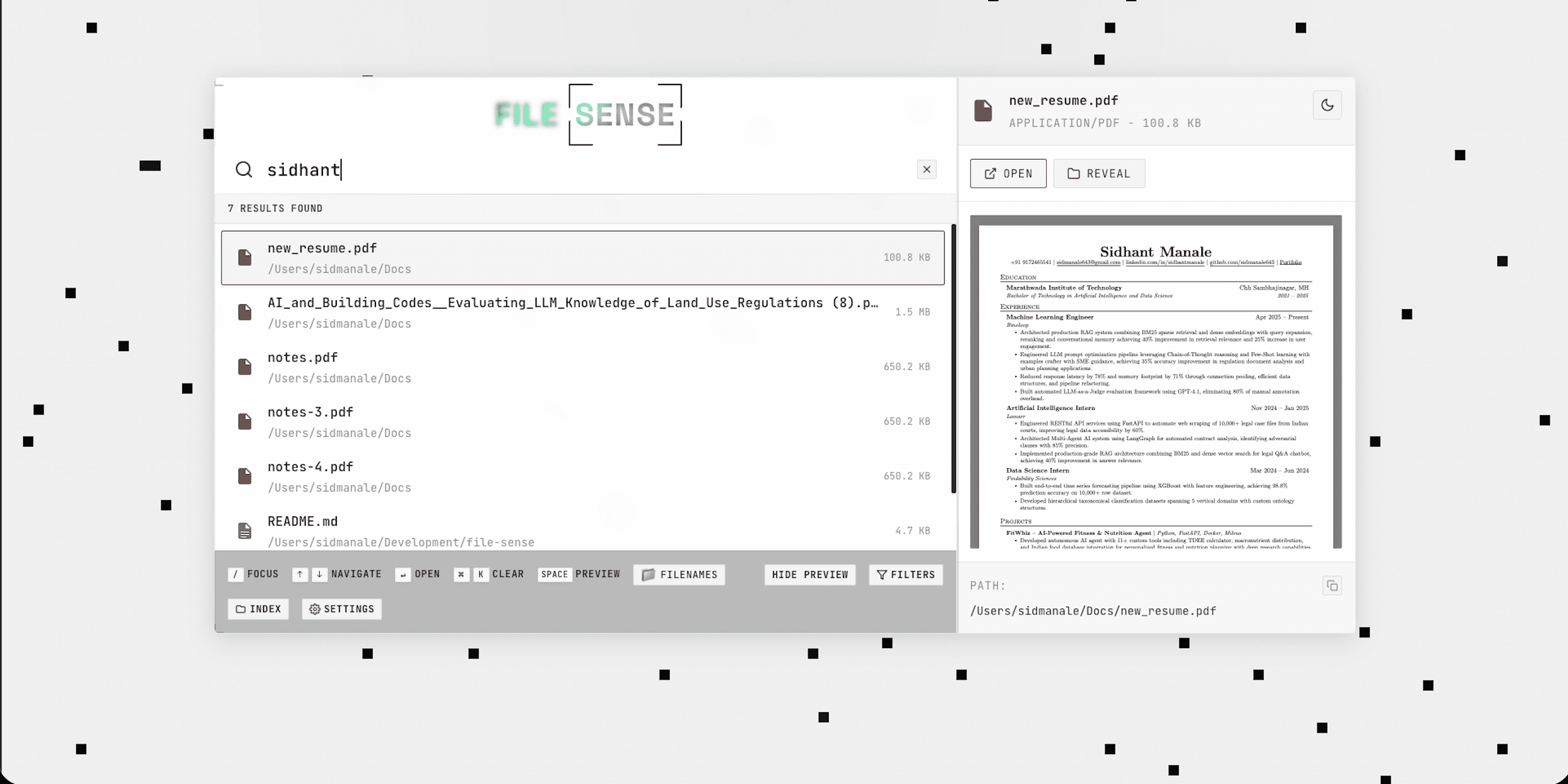
Modern Web Interface
- React + TypeScript: Clean, responsive frontend
- Real-time Search: Debounced input with instant results
- File Preview: Preview documents directly in the browser
- File Actions: Open files and folders from the search interface
- Keyboard Navigation: Power-user friendly keyboard shortcuts
How It Works
Indexing Pipeline
The indexing process transforms your documents into searchable chunks:
from src.pp import Pipeline
pipeline = Pipeline()
result = pipeline.index_dir("/path/to/your/documents")
print(f"Indexed {result['inserted']} documents")The Pipeline:
- File Discovery: Recursive directory scanning
- Deduplication: SHA256 hash check to skip duplicates
- Text Extraction: Format-specific loaders (TXT, DOCX, PDF)
- Smart Chunking: Split documents into 1000-character chunks
- Dual Indexing: Build both BM25 and FAISS indices
- SQLite Storage: Persist metadata and content
Search Execution
curl -X POST http://localhost:8000/hybrid_search \
-H "Content-Type: application/json" \
-d '{
"query": "machine learning concepts",
"k": 10,
"alpha": 0.5
}'Search Parameters:
query: Your search query in natural languagek: Number of results to return (default: 10)alpha: Balance between BM25 (0) and dense (1) search (default: 0.5)deduplicate: Remove duplicate chunks from same file (default: true)rerank: Apply RRF reranking (default: false)
Result Fusion
FileSense combines results from both search methods:
- Parallel Execution: BM25 and dense search run simultaneously
- Score Fusion: Combine scores using weighted average or RRF
- Deduplication: Remove multiple chunks from the same file
- Metadata Enrichment: Add file path, type, and preview
Technical Architecture
Core Components
- Pipeline (
src/services/pipeline.py): Central orchestrator coordinating all operations - Hybrid Search (
src/services/hybrid_search.py): Core search logic with parallel execution - BM25 Retriever (
src/services/bm25_ret.py): Lexical search with disk caching - Vector Index (
src/services/idx.py): FAISS index management - Embeddings (
src/services/emb.py): Sentence embedding generation (Qwen3-Embedding-0.6B) - Text Chunker (
src/services/text_chunker.py): Smart document splitting - File Manager (
src/services/file_manager.py): SQLite database operations - Document Loaders: Format-specific text extraction (TXT, DOCX, PDF)
Database Schema
SQLite database (./db/db.sqlite3) stores:
Files Table:
- Document ID, file hash (SHA256)
- File path, name, type, size
- Text content, chunk index
- Modified timestamp
Folders Table:
- Folder path and recursive flag
- Indexed file count
- Last indexed timestamp
Caching Strategy
Persistent cache files in ./db/:
bm25_cache.pkl: BM25 retriever statefaiss_index.bin: FAISS vector indexdb.sqlite3: Document metadata
API Endpoints
| Endpoint | Method | Description |
|----------|--------|-------------|
| /health_check | GET | Health check |
| /search | POST | Legacy filename + content search |
| /hybrid_search | POST | Primary hybrid BM25 + dense search |
| /index | POST | Index all files in a directory |
| /index_files | POST | Index specific files by path |
| /unindex | POST | Remove files by ID, path, or hash |
| /indexed_files | GET | List indexed files with pagination |
| /preview_file | POST | Preview file content |
| /open_file | POST | Open file in default app |
| /open_folder | POST | Open folder in file manager |
| /folders | GET/POST | List/add indexed folders |
Technology Stack
Backend
- Python 3.12+: Core language
- FastAPI: Modern async web framework
- Uvicorn: ASGI server
- FAISS: Facebook AI Similarity Search for vector indexing
- BM25s: Fast BM25 implementation with incremental updates
- Sentence Transformers: Qwen3-Embedding-0.6B for embeddings
- SQLite: Lightweight database for metadata
- Docling: PDF OCR and document parsing
- python-docx: Word document processing
Frontend
- React 18: UI framework
- TypeScript: Type-safe development
- Vite: Fast build tool
- Axios: HTTP client
Why I Built This
The Problem
Traditional file search has limitations:
- Keyword Matching: Misses documents that use different words
- No Context: Can't understand meaning or intent
- Slow Performance: Linear search through all files
- Format Limitations: Struggles with PDFs and complex formats
- No Preview: Requires opening files to check relevance
The Solution
FileSense addresses these issues:
- Semantic Understanding: Finds documents by meaning, not just keywords
- Hybrid Approach: Combines lexical and semantic search for best results
- Fast Retrieval: Millisecond search across thousands of documents
- Format Agnostic: Handles TXT, DOCX, and PDF with OCR
- Rich Preview: See document content before opening
Installation & Usage
Quick Start
# Clone the repository
git clone https://github.com/sidmanale643/file-sense.git
cd file-sense
# Create virtual environment and install dependencies
uv sync
# Activate the virtual environment
source .venv/bin/activate
# Start the API server
uvicorn main:app --reloadThe API runs on http://localhost:8000 with auto-generated docs at /docs.
Frontend Setup
cd frontend
npm install
npm run devThe UI runs on http://localhost:5173.
Development Status
Current Features
- Hybrid BM25 + dense search
- Multi-format document support
- PDF OCR via Docling
- Smart text chunking
- Incremental index updates
- Folder management
- File preview and actions
- Modern React UI
- Persistent caching
Technical Highlights
- Parallel search execution for low latency
- Incremental BM25 updates (much faster than refitting)
- Memory-mapped FAISS index for efficiency
- Hash-based deduplication
- Thread-safe database operations
Impact & Vision
FileSense represents a new approach to personal document search - combining the reliability of traditional keyword search with the intelligence of semantic understanding. Whether you're searching through research papers, documentation, or personal notes, FileSense helps you find what you need by understanding what you mean.
The project is actively maintained with ongoing improvements to search quality, performance, and user experience.