How to hit prompt caches more often
Maximizing prompt cache hits explaing
What you're actually caching
Prompt Caching is often viewed like a browser cache: one user, one session, one conversation. That picture is wrong enough to cause bad designs. Prompt caching is based on content. When the inference engine processes a prompt, it stores key-value tensors in fixed-size blocks, and each block gets an identity from its content which is done by hashing the contents of the block and the hashes of the previous blocks effectively creating a hash chain.
If two users send requests with the same prefix, they create the same blocks. Those blocks can be shared. This is why the system prompt is usually the most valuable thing to cache. It is the part most likely to stay identical across requests.
So the real question is not "how do I cache more conversations?" It is "how do I structure prompts so more tokens reuse blocks that already exist?"
There is a big gap between "this should be cacheable" and "this actually gets cached." On OpenAI, the cache only activates for prompts of 1024 tokens or longer. Below that threshold, every request is a full prefill.
The annoying part is that hit rates can still be low because the prefix changes before the reusable blocks are reached. Every miss pays the full input-token price. Cache reads are roughly 10x cheaper. In agentic workloads, where files, instructions, and tool outputs are often much larger than the model's reply, that difference stops being theoretical pretty quickly.
How prompt caching works
Prompt caching reuses the work already done for the beginning of a prompt. The model does not remember previous runs by itself. Without caching, each request recomputes the full prompt from scratch. With caching, the system stores the computed key-value tensors for a stable prefix and reuses them when a later request starts the same way.
The cache is usually built from blocks, not whole conversations. The system splits the prompt's KV tensors into fixed-size chunks and gives each chunk an identity, often based on a hash of its content and the chunks before it. This is why the beginning of the prompt matters so much. If the first blocks are identical, they can be reused. If something changes early, every block after that point gets a different identity and has to be recomputed.
Cache routing is the first step. In a distributed inference system, cached blocks usually live on the machine, worker, or cache tier that created them. A request has to be routed back near those blocks before it can benefit from them. Systems commonly do this by using a stable identity for the prompt prefix, such as a hash or routing key, so requests with the same shared prefix tend to land in the same place.
Cache lookup happens after routing. Once the request reaches a worker, the system checks whether the beginning of the new prompt matches cached blocks already available there. A cache hit means the matching prefix is reused, which reduces prefill work, latency, and cost. A cache miss means no usable match was found, so the system processes the prompt normally and may store the prefix for future requests.
The rule is simple: prompt caching rewards stable prefixes. Put shared instructions, tool definitions, examples, schemas, and project context first. Put user-specific or changing content later. More requests will hit the cache when they start with the same tokens and reach the same cache location before the entry expires.
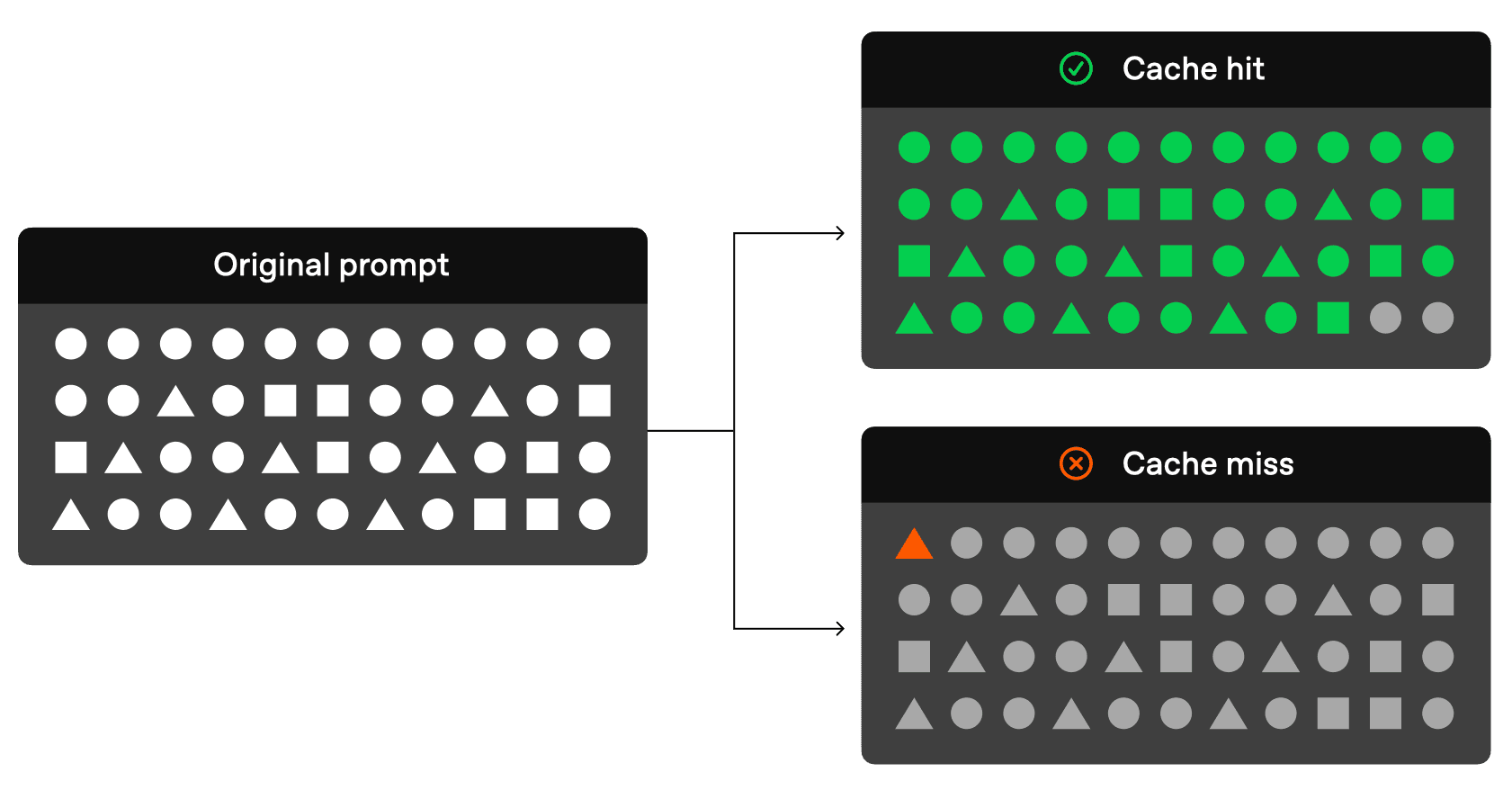
Source: OpenAI Prompt Caching Guide
Techniques that matter
1. Keep context append-only
Cutting, editing, or reordering tokens in the middle of a conversation invalidates every block after the change. If you truncate tool-call outputs to save context-window space, you destroy the cache from that point forward. Claude Code's compaction mechanism is almost certainly append-only for this reason. Let context grow instead of editing the middle of it. Even one changed character in a tool output can break the cache chain.
2. Serialise JSON deterministically
When you serialise JSON in tool-call outputs, use sort_keys=True. Two JSON objects can mean the same thing but list keys in a different order. The model does not care about semantic equivalence here. Different strings create different token streams, which create different block hashes. Same data, different bytes, missed cache.
3. Canonicalize the whole prompt
Determinism is not only about JSON. Keep whitespace, section separators, markdown formatting, casing, and template rendering stable. Extra blank lines, reordered examples, or slightly different headings can change the token stream. Treat the prompt like a compiled artifact, not a casual string assembled differently across code paths.
4. Put static content first
Place instructions, examples, tool definitions, and anything that rarely changes at the beginning of your prompt. Put user-specific data, timestamps, and variable content at the end. Cache hits only work on exact prefix matches, so the reusable material has to come before the noisy material.
Keep per-user data out of the system prompt. A system prompt shared across your whole API-key organisation can be cached once and reused by every request. If you add a user ID, timestamp, or session token at the top, the hash chain breaks at block 0, and nothing after it can be shared. Put changing content at the end of the messages array so it only affects the trailing blocks, not the shared prefix.
5. Keep volatile IDs out of the prompt
Request IDs, trace IDs, UUIDs, timestamps, deployment hashes, and session tokens should live in metadata when the provider supports it. If they must be included in the prompt, put them as late as possible. A random ID near the top turns every request into a unique prefix, even when the instructions underneath are identical.
6. Version static prefixes deliberately
Prompt versions are useful because they make cache busting intentional. Put a stable version marker near the static prefix, then change it only when the prompt's reusable structure actually changes. Do not use build IDs or deploy timestamps as version markers, because they bust the cache on every release even when the prompt content is the same.
7. Normalize retrieved context order
RAG and search results should be ordered deterministically when possible. Sort by document ID, path, timestamp, or relevance score with a stable tie-breaker. If the same query returns the same chunks in a different order, the meaning may be the same, but the token sequence is not.
8. Don't shuffle tool definitions
Tool schemas usually sit in the messages array before user content. If you add, remove, or reorder tools mid-session, the prefix breaks at that point. If tool availability has to change, use Anthropic's Tool Search approach: append tool definitions when needed instead of inserting them into a fixed earlier position. That keeps the sequence append-only.
10. Choose your provider and configure routing
Some providers handle routing automatically. Some expose routing hints, cache keys, explicit cache breakpoints, or retention controls. The mechanism is still the same: stable shared prefixes need to land near the cached blocks they want to reuse. High request volume can make this worse if traffic for the same prefix is spread across too many workers.
Anthropic uses explicit caching: you choose when to cache and for how long, and you pay for that control. In practice, when caching is requested, Anthropic routes to cached entries close to 100% of the time. For agentic apps with long contexts, boringly predictable latency can be worth the extra cost.
11. Pre-warm your cache
On OpenAI, caches are tied to specific machines and can expire after 5-10 minutes of inactivity. Before peak traffic or after deployments, send a request with your full static prefix to populate the cache. This matters most when the system prompt or tool definitions are long enough to make prefill expensive. On Anthropic, you pay to write the cache explicitly, so warming is built into the cost model.
12. Monitor cached_tokens
The OpenAI API returns a cached_tokens count in usage.prompt_tokens_details. If you expect a cache hit and this number is zero, your prefix changed somewhere. Log the field, compare it against your prompt length, and trace backwards from the first differing token. The fastest debugging move is usually to compare the tokenized prompts and find the first token that differs between a hit and a miss.
What doesn't break your cache
Temperature, top_p, and top_k control randomness during final token selection, after attention has produced embeddings. KV caching stores the intermediate K and V matrices, not the final probabilities. Changing temperature from one request to the next does not invalidate a cached prefix. Sampling settings are not the thing to worry about.
TTL
For stateless API usage, the techniques above are usually enough. For production agentic workloads, one infrastructure setting can matter more than all of them: time-to-live.
Providers keep cached KV tensors for a limited window. The defaults are short: on OpenAI, in-memory caches last 5-10 minutes of inactivity, up to a maximum of one hour during off-peak periods. Anthropic holds caches for roughly 1 hour. After the window expires, the next request recomputes from scratch. In an agentic conversation, the median time between requests may be 10-15 seconds, but the mean can stretch into minutes or hours because humans pause, read, and respond slowly. A 1-minute TTL misses constantly because requests often arrive after it expires. A 5-minute TTL catches more, but still misses the long tail of human delays. A 1-hour TTL is much steadier, but it needs more cache capacity.
OpenAI recently introduced extended retention on newer models (gpt-5.5, gpt-5.5-pro, and others). Extended caching offloads KV tensors to GPU-local storage when memory fills up, which stretches the retention window to a maximum of 24 hours. This matters for agentic workloads because it covers the long tail of human delays that in-memory caches miss. You select it per request with prompt_cache_retention: "24h". On these models, in-memory retention is no longer available; the default is 24h. Older models still default to in-memory.
This is the awkward timing mismatch: agents move quickly, humans respond slowly. The agent loop creates reusable KV-cache data during its fast cycle. If the memory tier cannot hold that data until the next turn, which may arrive several minutes later, the cache expires and the system pays the full prefill cost again. If you run your own inference, memory tiering, such as HBM to DRAM to NVMe, determines whether you can afford the longer TTLs that make hit rates stable. Capacity alone is not enough. A cache that can theoretically store everything but takes too long to fetch data back to the GPUs is no better than a smaller, faster cache.
The checklist
- Stable prefix, dynamic content at the end
- 1024-token minimum prompt length (OpenAI)
- Append-only context; no mid-sequence edits
- Deterministic serialisation with
sort_keys=True - Canonical prompt rendering: stable whitespace, headings, examples, and separators
- Volatile IDs and timestamps out of the prompt body
- Stable prompt versions; no deploy hashes in the prefix
- Deterministic RAG ordering with stable sorting and tie-breakers
- Fixed tool definitions, or append-only additions
- Routing consistency so shared prefixes land near their cached blocks
- Deliberate provider choice when explicit caching gives better latency
- TTL-aware architecture; prefer extended retention (24h) for agentic workloads
- First-different-token debugging for unexplained misses
These choices compound. A 10x cost difference often comes down to three things: whether prompts share prefixes, whether you edit the middle of the sequence, and whether the TTL lasts long enough to catch the next request.